
Settings
AttenDeep’s all-in-one HRMS empowers HR professionals with a powerful Settings module, serving as a centralized control panel to tailor and enhance their HR operations. Within this module, users can explore and configure a wide range of essential features, including:
General Settings:

The General Settings section in AttenDeep provides access to a range of customizable features designed to improve and tailor the HR management process. It allows organizations to activate or deactivate specific functionalities according to their operational needs, along with configuring general settings such as date/time formats, mail server setup, and more.
User Permissions and User Groups:
Within the Settings feature of AttenDeep, administrators have comprehensive control over user permissions, allowing them to define who can access specific modules and perform designated actions. Additionally, user groups can be created and managed to streamline access control, enabling administrators to assign roles and functionalities to multiple users collectively, which significantly reduces the manual effort involved in configuring permissions individually.
Date and Time Configuration:
Within the Settings feature of AttenDeep, administrators can tailor date and time formats to align with regional or organizational preferences. This ensures that the HRMS interface presents dates and times in a format that is both familiar and suitable for local or global operations.
Furthermore, the date and time settings allow configuration of work hours, time zones, and public holidays, enabling precise tracking of employee attendance, leave, and other time-based activities.
Mail Server Configuration::
AttenDeep’s Settings feature includes robust mail server configuration options, enabling seamless integration of email communication within the HRMS platform.
Administrators can enter SMTP (Simple Mail Transfer Protocol) server details to activate features such as automated alerts, email notifications, and direct communication with employees or candidates through the system.
To maintain security and data integrity, mail server settings also support encryption protocols like SSL/TLS, ensuring that all HR-related correspondence remains protected and confidential.
Base Configuration:
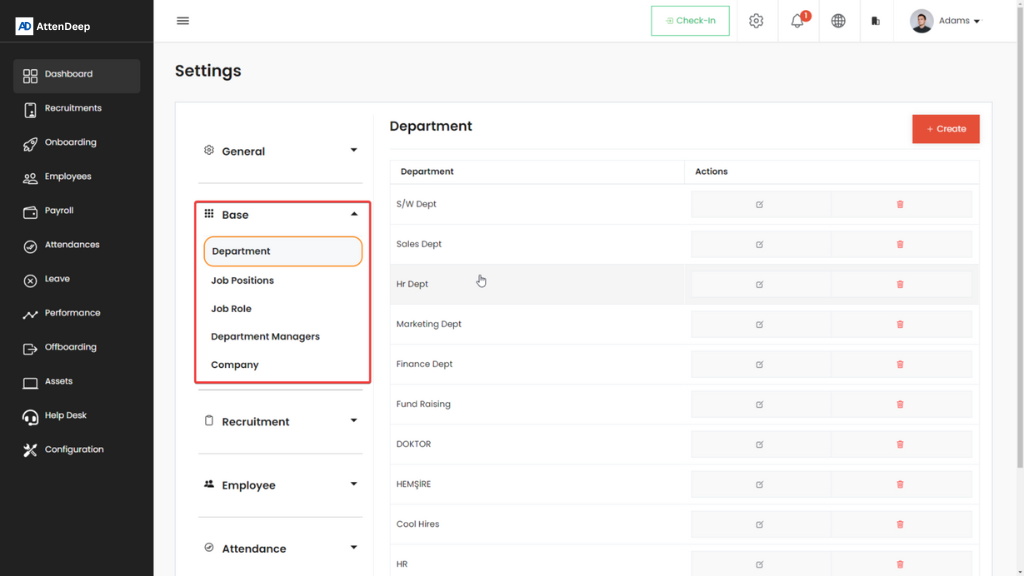
The “Base” configuration section in Horilla’s Settings is the foundational pillar upon which the entire HR management infrastructure is built. This section encompasses critical elements that collectively define the organizational structure, user roles, and key attributes necessary for effective HR operations. Here’s an in-depth exploration of each component:
Company:
Located within the “Base” configuration, the Company Details module in AttenDeep serves as the foundation for establishing a unified organizational identity. Administrators can accurately enter key details such as the official company name, upload the corporate logo for branding, and provide the registered physical address.
This setup is more than just visual customization—it plays a vital role in building a consistent and professional company profile within the HRMS. The information configured here is reflected throughout the platform, ensuring uniformity for both internal users and external stakeholders.
Department:
Description: The “Department Management” feature within the “Base” configuration introduces a systematic approach to organizational structure. Administrators wield the power to create, organize, and manage distinct departments, each with a unique identifier and a designated head. This functionality is pivotal for delineating reporting lines, facilitating efficient team management, and fostering a clear understanding of the organizational hierarchy. Categorizing employees into specific departments not only streamlines communication and collaboration but also enhances the overall organizational workflow.
Job Positions:
The Job Positions section enables administrators to define and manage the various roles within the organization. This includes specifying job titles, detailing associated responsibilities, and establishing reporting hierarchies where necessary. Clearly structured job positions play a crucial role in the recruitment process, helping HR professionals align candidate qualifications with organizational requirements. This feature supports a streamlined and transparent approach to workforce planning and development.
Job Roles:
The Job Roles configuration empowers administrators to define and tailor specific roles within the organization. These roles are more than just titles—they encompass clearly assigned responsibilities, permissions, and access levels for each role holder. This functionality enhances user management by ensuring that individuals have streamlined access to the modules and features relevant to their job functions.
Recruitment Settings

The Recruitment Settings in AttenDeep’s HRMS provide a comprehensive set of tools designed to streamline and enhance the hiring process. A key highlight of this feature is the inclusion of:
Candidate Reject Reason:
The “Candidate Reject Reason” feature in AttenDeep enhances clarity and communication throughout the recruitment process. When a candidate is not selected, administrators can choose from a predefined list or provide custom input to specify the reason for rejection. This functionality promotes standardized and detailed documentation, offering valuable insights into recruitment patterns, improving feedback quality for candidates, and supporting the continuous improvement of hiring strategies.
Employee Settings:

The “Employee” settings in AttenDeep’s HRMS offer administrators robust tools to efficiently manage and personalize different aspects of employee data and work configurations. Key functionalities within this section include:
Work Types:
Work Types functionality in AttenDeep empowers administrators to define and organize various work arrangements tailored to the organization’s needs. Examples include Work from Home, Field Work, and Office Work. This flexibility ensures precise tracking of employee activities and offers meaningful insights into work trends. Administrators can easily configure and manage different work types to reflect the unique nature of roles across the organization.
Employee Shifts and Shift Schedules:
Within the “Employee” settings of AttenDeep, administrators can configure and oversee employee shifts and scheduling. This includes setting up defined shifts—such as morning, afternoon, and night—and assigning employees accordingly. The system’s flexibility in shift and schedule management enables seamless alignment with organizational needs, promoting efficient and effective workforce coordination.
Disciplinary Actions Types:
The “Disciplinary Action Types” feature in AttenDeep enables administrators to efficiently record and classify different forms of disciplinary measures that may be applied to employees. These may include predefined actions such as verbal warnings, written warnings, and suspensions. By standardizing these actions, HR teams can ensure consistent policy enforcement and maintain a transparent record of employee behavior across the organization.
Rotating Shift Types:
Description: The “Rotating Shift Types” feature enhances flexibility in workforce scheduling by allowing administrators to define shift patterns that rotate over time. This setup enables employees to engage in varied roles or work settings within a specific timeframe. Ideal for organizations with dynamic operations, this functionality supports greater adaptability and encourages the development of diverse skill sets among employees.
Attendance Settings:

The “Attendance Settings” in AttenDeep’s HRMS simplify and enhance attendance management by prioritizing accuracy and adaptability. This section offers a range of powerful features designed to support flexible and precise tracking of employee attendance.
Grace Time Feature:
The “Grace Time” feature allows administrators to define a specific window during which employees can mark their attendance without being marked as late. This feature accommodates slight delays or early arrivals, ensuring fairness in attendance tracking.
Attendance Break Point:
The “Attendance Break Point” feature in AttenDeep offers a centralized setup for defining essential rules that support accurate and consistent attendance tracking:
Minimum Working Hours for Attendance Approval: Set the minimum number of hours an employee must complete for their attendance to be approved.
Overtime Limit Configuration: Specify the maximum number of overtime hours allowed before additional authorization is required.
Attendance Validation Rules: Configure criteria such as the allowed number of breaks or total working hours within a defined period to ensure reliable attendance validation.
Help Desk – Ticket Type:

The “Ticket Type” option within the Help Desk module plays a crucial role in categorizing and organizing the nature of employee support requests or inquiries. This classification enhances the overall efficiency and structure of the help desk system.
In conclusion, AttenDeep’s HRMS stands out as a comprehensive and adaptable solution for HR professionals aiming to streamline and optimize their human resource processes. Its powerful Settings module acts as a centralized control center, offering extensive customization options across essential areas such as General Settings, Base Configuration, Recruitment Settings, Employee Settings, and Attendance Settings.
General Settings empower administrators to align the system with organizational policies by configuring user permissions, user groups, date and time formats, and mail server details.
Base Configuration provides the structural framework for HR operations, enabling the definition of company information, department hierarchies, job titles, and role-based assignments.
Recruitment Settings improve communication and transparency in the hiring process through features like Candidate Reject Reason, which facilitates meaningful feedback and supports better hiring decisions.
Employee Settings allow for efficient management of work arrangements, shift types, disciplinary actions, and rotating schedules—fostering flexibility and workforce adaptability.
Attendance Settings prioritize accuracy and flexibility through features such as Grace Time and Attendance Break Point, ensuring reliable attendance tracking.
The Help Desk feature, enhanced by Ticket Type categorization, streamlines employee support by organizing requests for faster and more effective resolution.
With its intuitive interface and robust configuration capabilities, AttenDeep’s HRMS is designed to meet the diverse needs of HR teams, delivering a reliable platform for efficient, transparent, and well-organized human resource management.