
Performance Management System (PMS)
The Performance Management System (PMS) in AttenDeep's HR software helps make handling employee performance easier. It puts everything like goals, reviews, feedback, and development plans all in one place. This helps HR keep track of how people are doing, give them useful feedback on time, and build a culture where everyone is always improving. With tools you can customize and built-in data tracking, PMS helps your team connect individual efforts to bigger company goals, boosting work quality, involvement, and overall success.
Objectives
The main purpose of PMS is to help employees perform better and keep their efforts aligned with company targets.
Inside AttenDeep HRMS, goals are split into two parts: "Self Objectives" and "All Objectives." Regular employees see their own tasks under "Self Objectives" to focus better. HR or managers use the "All Objectives" tab to see everything company-wide. This big-picture view helps in making smart decisions and ensures the goals fit the company’s mission. The AttenDeep Objectives section keeps it all organized and easier to manage.

1. Self Objectives
The “Self Objective” tab (2 from image.1) lets each employee see and manage their own work goals and track how far they’ve come.
2. All Objectives
The “All Objective” tab (3 from image.1) lets managers check in on everyone's performance across the team or organization.
You can get to objectives from the Performance menu (1 from image.1). This gives you a full view of goals to make checking on them easier.
Create Button
HR can click the “Create” button (4 from image.1) to set new goals and assign them to employees who need to work on them.
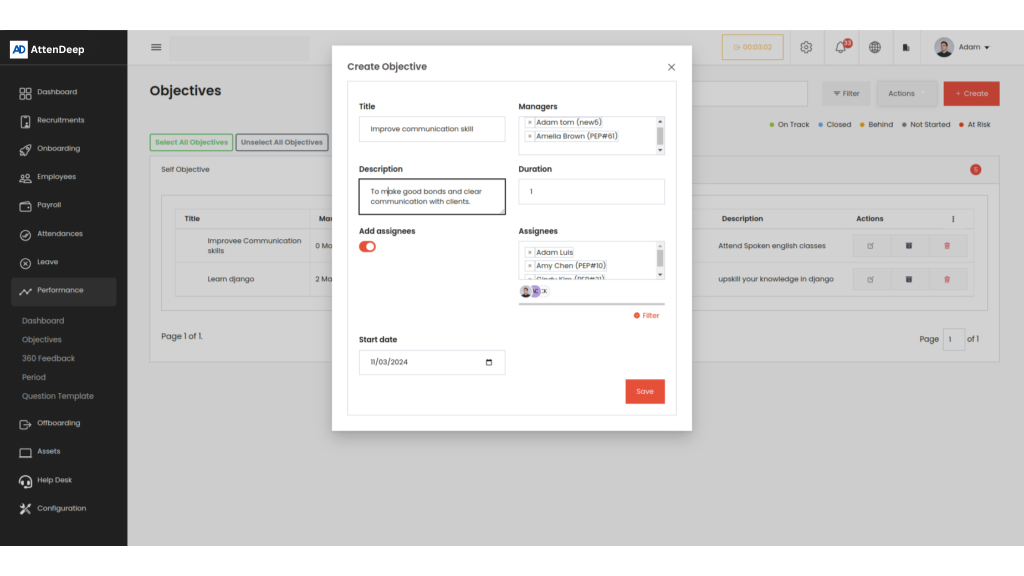
Detailed View of Objectives
Clicking on any goal shows which employees it belongs to, their current status, and how far along they are with each key result. You also get a summary of how close they are to finishing that goal overall.
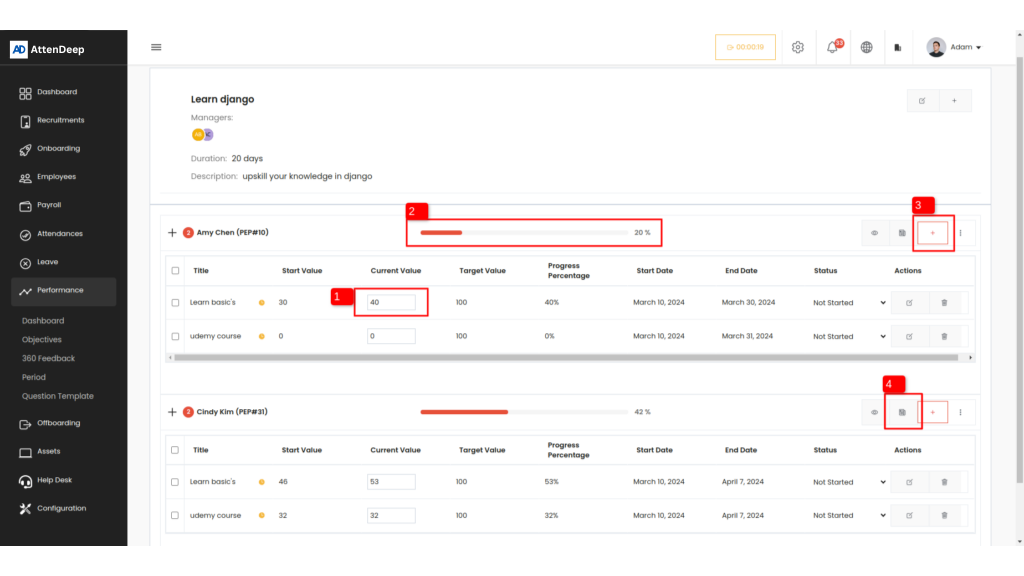
Employees can update their work by entering their current progress (1 from image.3). Then, AttenDeep checks this against the target and updates both the task and total goal progress (2 from image.3). When they’re done, it shows 100% complete.
Add Key Results for the Employee’s Objective
Managers can add key tasks linked to goals for employees. This lets them track things better in one place and make sure everyone’s performance is managed on time.

Activities
Clicking the activity button shows a box with every change made to the goal. People can also leave notes or messages here for the employee working on it. This helps in better teamwork and communication.

360° Feedback
360-degree feedback collects opinions about someone’s work from different people like peers, supervisors, juniors, and even clients. It gives a rounded view of how a person is doing, what they’re good at, and where they need to grow. AttenDeep HR helps collect and manage this feedback so that employees can grow, and HR can make smart decisions about training and performance.
Feedback View
The 360 feedback menu takes you to a screen where all feedback is grouped: Self, Requested, All, and Anonymous. Only managers can view “All Feedback,” which includes everything except the anonymous ones. This keeps private comments hidden but lets managers see the big picture.

Self-feedback
This tab (2 from image.6) shows what the person wrote about themselves.
Requested feedback
This tab (3 from image.6) shows feedback the person asked for from coworkers or supervisors.
All feedback
The All Feedback tab (4 from image.6) shows every type of feedback: self, requested, and others combined.
Anonymous feedback
The anonymous feedback tab (5 from image.6) shows hidden feedback that doesn’t reveal who sent it.
Create Button
When you hit the Create button (6 from image.6), you get a form to write feedback. You can choose who it’s for, and once saved, AttenDeep shows it under the “Requested Feedback” section and tells the person about it.

Feedback Answer
People can give feedback by filling in questions set by the employee.

Once done, AttenDeep notifies the creator and lets them see the answers so they can reflect and improve.

Anonymous Feedback
Anonymous feedback is important because it lets people be honest without worrying. It helps HR learn about real issues and make better choices. AttenDeep HRMS protects who said what to keep things confidential.
Employees can give anonymous feedback using the Create button (7 from image.6). There’s a “Based on” option where they can select what the feedback is about:
- General: Feedback for everyone
- Employee: About a specific person
- Department: About a department
- Job position: About a certain job
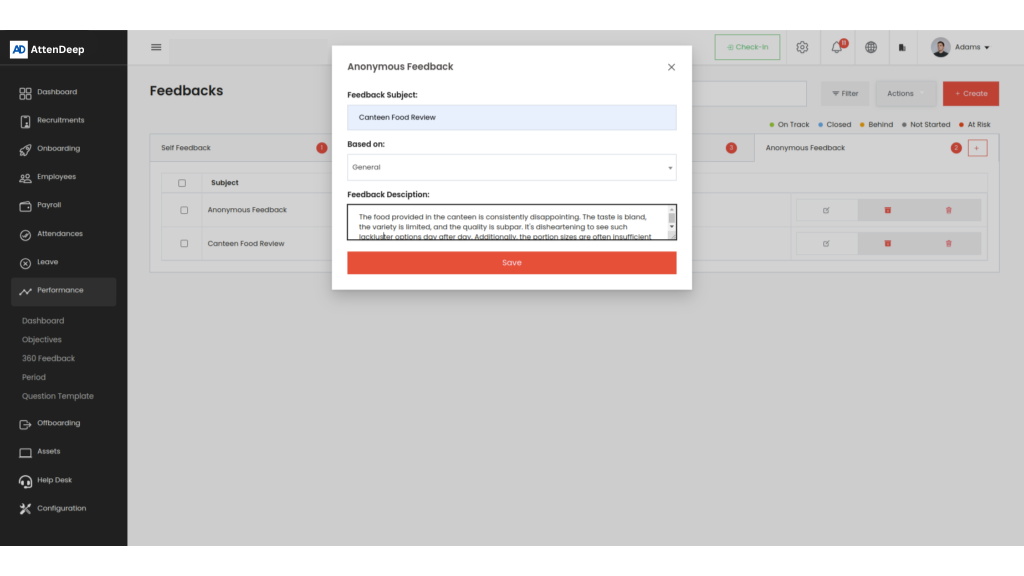
AttenDeep HRMS will show this feedback to the right people without showing who sent it.
Period
This screen helps manage time periods in HR and performance tasks. You can set start and end dates for each period to match your company goals. You can also update or delete periods easily to keep things current. It helps make performance tracking smooth and clear.

Question Template
You can build question templates here and include questions that match your goals. These templates help gather focused feedback during reviews.
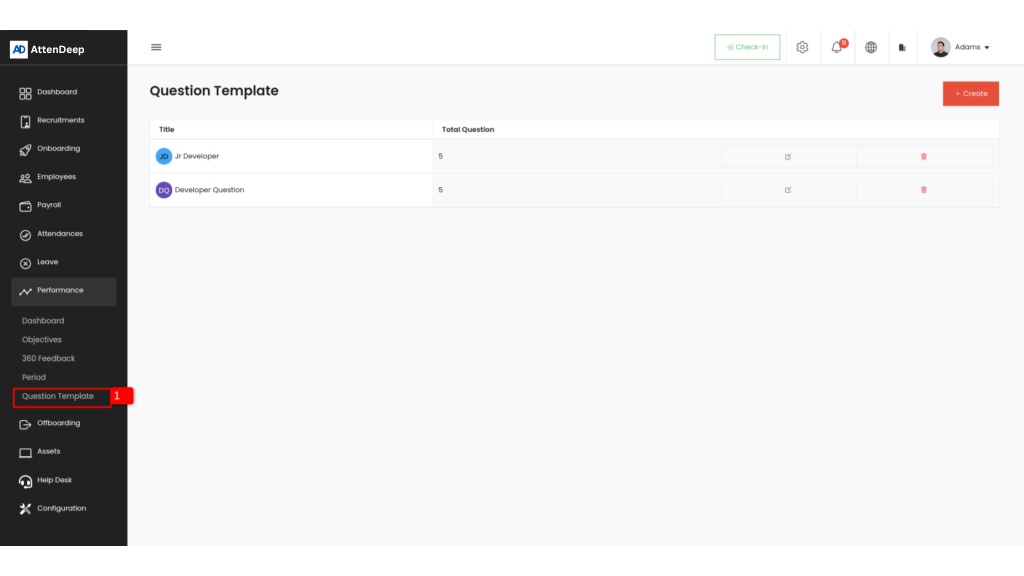
AttenDeep HR gives you different types of easy-to-use questions, helping you collect better feedback.

You can choose question types like Text, Rating, Yes/No, Multiple Choice, and Likert Scale. This helps you customize questions based on what you need inside AttenDeep HR Software.